

Two ways to tag, and they open the same picker
Select Actions below the description, or type@ anywhere in the description itself. Both open the same list, filtered by a row of tabs.
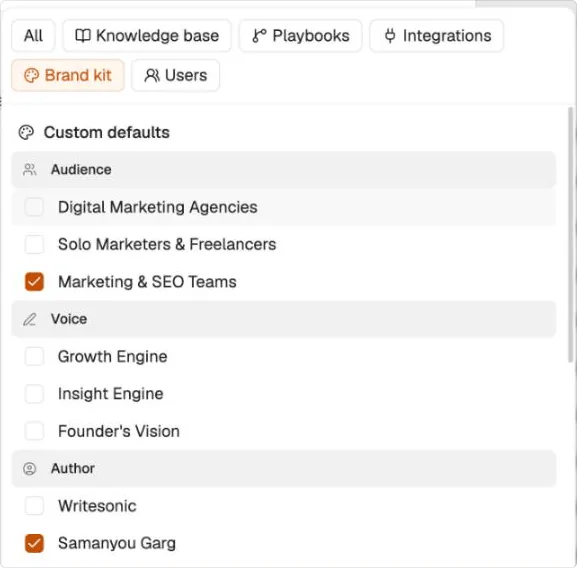
The picker, filtered to Brand kit. Tabs across the top, and a checkbox against anything you can tag more than one of.
One playbook per task, as many of everything else as you need
Tag a playbook and the task runs those exact steps rather than whatever approach the agent would have chosen. That is how you get a repeatable result out of a system that is otherwise probabilistic: describe the outcome in your own words, then name the playbook that has to produce it. A task takes one playbook. Tag a second and it replaces the first. Everything else is multi-select. Two audiences, an author and a content type can all sit in the same brief.Brand kit tags decide who it sounds like and who it’s for
The Brand Kit entries are the ones worth reaching for most often, because they answer the questions a brief usually leaves vague. Author sets whose voice it’s written in. Audience sets who it’s written for. Voice sets the register. Content type sets the shape of the deliverable, so a LinkedIn post and a landing page don’t come back looking the same. Mix them. An article written as one author for one audience is a different piece from the same article written as another.Tags sit inline, so write the sentence around them
A tag lands in the description as a chip where your cursor is. Everything else stays plain English.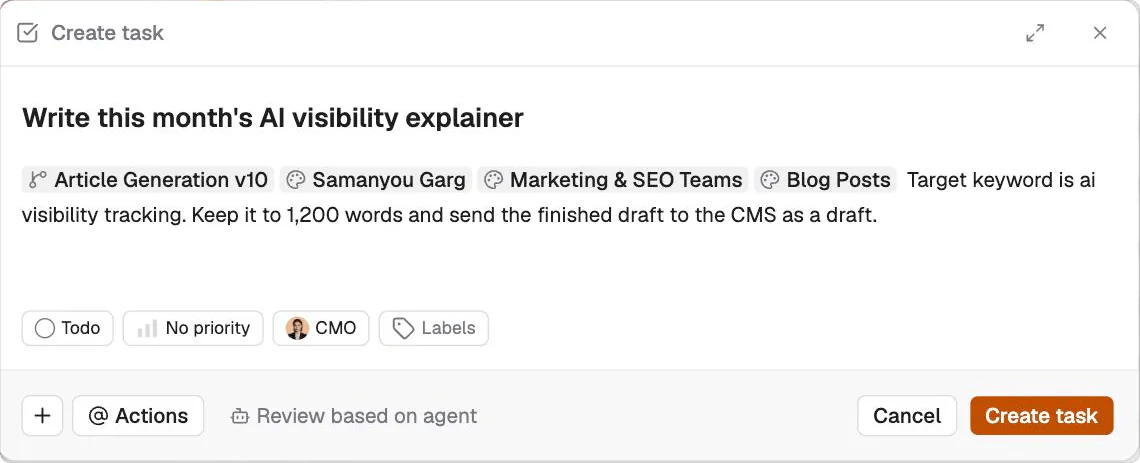
One task, four tags. The playbook sets the steps, the Brand Kit tags set the voice, the reader and the format, and the prose carries the rest.
What’s next
Writing good tasks
What to put in the prose around the tags.
Brand Kit
Set up the authors, audiences and voices you’ll tag.