

One timeline holds the changes and the signals
The log records changes to a page, technical and editorial, whoever made them, agent or human. Alongside those it records what happened afterwards from both a search and an AI search perspective. So a single page’s timeline might read: on 20 June you refreshed the content and rewrote the title. On 25 June ChatGPT started citing the page for a prompt it had ignored. On 26 June a new keyword entered the top ten. Those events sit next to each other in the order they happened. That’s the whole idea. On each page’s detail view, Activity sits beside Overview, SEO, AI Search and Content.Events are typed, and most carry the numbers
Entries are grouped by date and filtered by All, Changes or Alerts, with a legend separating alerts, changes and impact. Each entry names what happened rather than logging a diff. A few real ones:
The ones with before-and-after values state them inline. The rest carry a View details link.
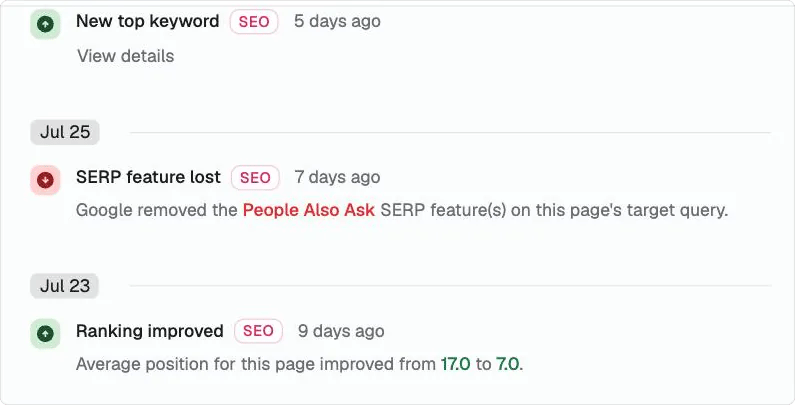
Entries are grouped by date and typed. A ranking change states the positions it moved between.
It shows correlation, and it says so
The log does not claim your change caused the result. It cannot, and nothing that reads a timeline can. What it gives you is the sequence, on the page, with dates. You decide whether the change and the signal are related. That judgement is yours, and it’s a better position than the usual one, where the change and the outcome live in different tools and nobody can line them up at all.Turn a hunch into an experiment, then scale it
The sequence becomes useful when you run it deliberately. Add FAQs to five pages. Wait, then read the five timelines. If all five moved in the same direction, you have something worth believing. Now run the same change across fifty pages, then a hundred, using a playbook and a grid so the change is identical every time. That is the difference between an opinion about what works on your site and a result you can repeat. It also means a change that did nothing gets found early, on five pages instead of five hundred. Leaving a comparable set of pages untouched makes the comparison stronger, though it isn’t required to get value from the log.What’s next
Page detail
See where the Activity tab lives.
Grids
Run a proven change across many pages.