

Overview
Content Optimization is Writesonic’s advanced GEO (Generative Engine Optimization) solution that helps your content achieve maximum visibility in AI-generated responses across platforms like ChatGPT, Claude, Gemini, and Perplexity. This feature analyzes your existing website content—articles, landing pages, and documentation—to identify specific optimization opportunities that enhance your brand’s presence in AI search results. By addressing these optimization points, you can increase your citation rates by 60-70% and ensure your brand appears prominently when AI platforms reference content in your industry.How Content Optimization Works
The Action Center scans your indexed content and evaluates it against proven GEO best practices. The system analyzes your pages and presents a comprehensive dashboard showing:- Total issues identified across your content
- Issue categorization by optimization type
- Issue count for each category
- One-click optimization buttons for immediate action(
Coming soon) - Competitive analysis showing how rival sites are performing
- Citation tracking to monitor your AI visibility improvements
Understanding the Action Center Dashboard
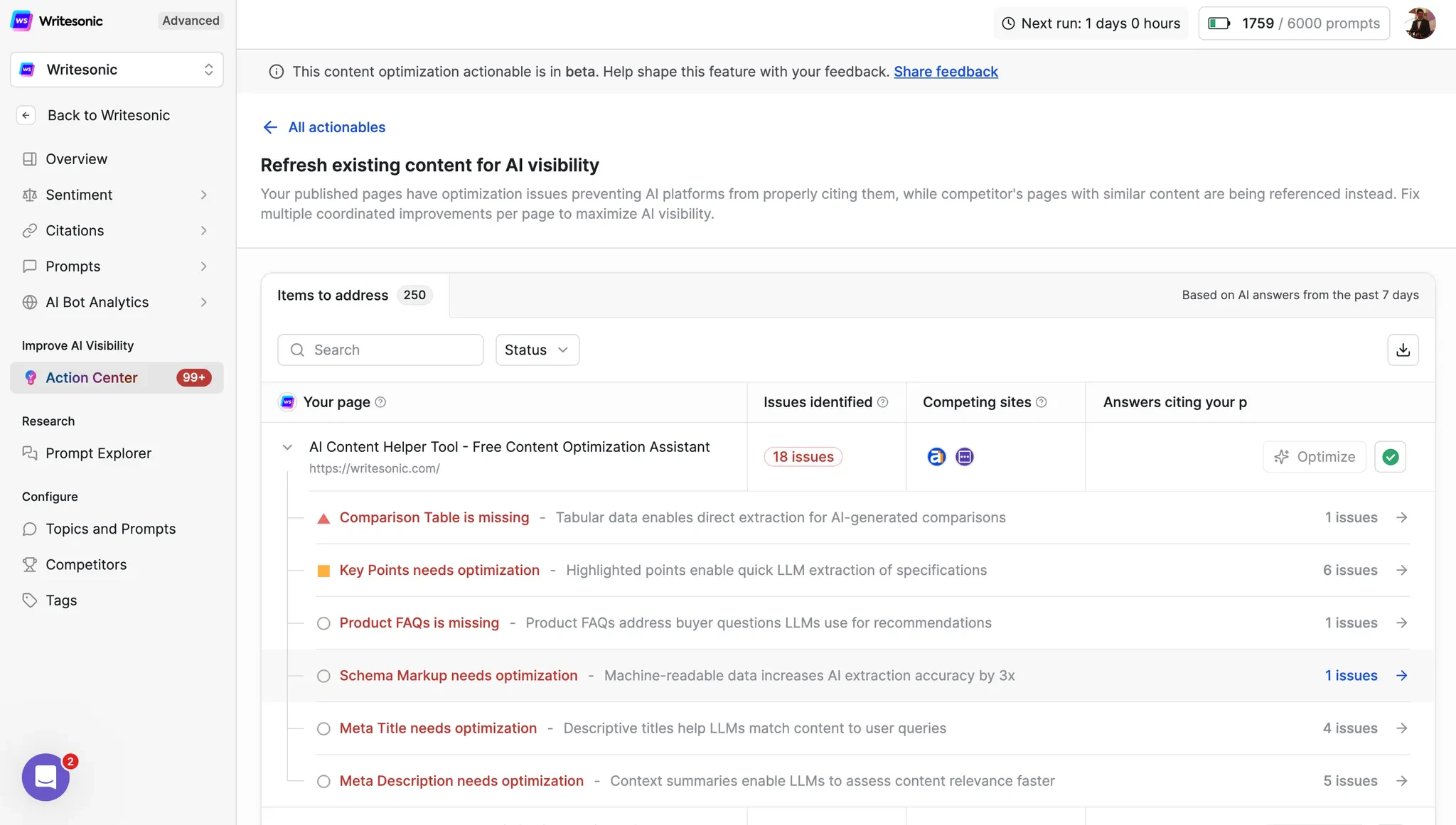
When you access Content Optimization in the Action Center, you’ll see:Issues Overview Panel
The main dashboard displays all identified optimization opportunities, organized by category. Each category shows:- Issue type (e.g., “Comparison Table is missing”)
- Number of sub-issues found across your pages
- Brief explanation of why this optimization matters
- “Optimize” button for immediate action(
Coming soon)
Priority Indicators
Issues are color-coded and marked based on their impact:- 🔺 Critical issues (red): Schema markup, title mismatches
- 🟡 Important optimizations (orange): Key points, FAQs, comparison tables
- 🔵 Enhancements (blue): Author credentials, brand mentions
Competitive Intelligence
The dashboard also shows:- Competing sites that are ranking for similar topics
- Current citation status - whether AI platforms are citing your content
- Performance comparison against industry benchmarks
Optimization Finders: Complete Guide
Below are all the optimization points our system identifies to improve your content’s AI visibility. Each finder includes detailed explanations and actionable insights.Content Accuracy & Relevance
Title-Content Mismatch
This finder detects when your page title promises content that isn’t fully delivered within the article body. AI models heavily weight title-content alignment when determining source credibility. What it checks:- Whether promised features, steps, or information in the title actually exist in the content
- If the scope described in the title matches what’s covered (e.g., “Complete Guide” should be comprehensive)
- Alignment between title keywords and actual content focus
Meta Description-Content Mismatch
This finder identifies when your meta description promises content, features, or benefits not actually present on the page, or when it fails to accurately summarize the content’s value proposition. What it checks:- Alignment between meta description claims and actual page content
- Whether key benefits mentioned in the description are substantiated in the content
- If the description accurately reflects the content’s depth and scope
Outdated Freshness Indicators
This finder flags temporal indicators (years, dates, version numbers) in titles, content, or schema that are older than 3 months from the current date. What it checks:- Year references in titles (e.g., “Best CRM Software 2024”)
- “Last updated” dates in schema markup
- Version numbers for software/technical content
- Temporal phrases like “this year,” “recently,” “latest”
Lead-Content Mismatch (Landing Pages Only)
This finder detects when the lead section (opening paragraph) makes claims or promises that the rest of the page doesn’t fulfill, or when it’s too vague to establish clear value. What it checks:- If the lead’s scope matches the actual product/service offering
- if the Freshness indicator in the lead section is updated or not
- Alignment between lead section promises and available features
Content Structure & Clarity
Self contained Descriptions or not
This finder identifies descriptions that lack specific, self-contained information that AI models can extract and understand independently without additional context. Why it matters: AI models need self-contained, specific information to generate accurate responses. Vague content is typically skipped in favor of more precise sources, reducing your visibility by up to 40%. How to fix: Replace vague statements with specific details. Instead of “improves performance significantly,” write “improves page load speed by 40% (from 3.2s to 1.9s).”Key Points Needs Optimization
This comprehensive finder evaluates multiple aspects of how key information is presented in your content. In the Action Center, you might see “6 issues” under this category, each representing a different aspect needing improvement.Too Long
- What it checks: Individual takeaways exceeding 80+ words or 5+ sentences
- Impact: Reduces scannability and snippet extraction likelihood by 45%
- Fix: Break long takeaways into concise, single-concept statements under 80 words
Wrong Placement
- What it checks: Key takeaways positioned at bottom or middle of content instead of near the top
- Impact: 60-70% higher citation rates when key information is front-loaded (within first 20% of content)
- Fix: Move key takeaways to immediately after the introduction or as a highlighted box near the top
Missing Structure
- What it checks: Takeaways written in paragraph form instead of bullet points or numbered lists
- Impact: AI models parse structured lists 60% more effectively than paragraph text
- Action Center guidance: The tool will show you exactly which sections need restructuring and provide formatting templates
Wrong Count
- What it checks: Fewer than 3 takeaways (too sparse) or more than 10 (information overload)
- Impact: Optimal range of 3-7 takeaways shows highest engagement and citation rates
- Fix: Consolidate or expand to hit the 3-7 takeaway sweet spot
FAQ Optimization
Long FAQ Answers/Questions
This finder identifies FAQ entries that are too lengthy for optimal AI extraction and featured snippet eligibility. What it checks:- Answers exceeding 100 words
- Questions longer than 15 words
- Multiple questions combined into one
- Answers containing multiple unrelated concepts
Product FAQs is Missing (Product Pages Only)
When the Action Center shows “Product FAQs is missing - 1 issue”, it means your product page lacks specific FAQs that address buyer questions LLMs use for recommendations. What it checks:- Presence of product-specific specifications in FAQs
- Compatibility and integration questions
- Unique use cases or applications
- Product-specific troubleshooting
Schema FAQ Mismatch
This finder validates that all questions marked up in your FAQPage schema are actually visible on the page. What it checks:- Every schema FAQ entry has a corresponding visible element
- No hidden or JavaScript-only FAQ content in schema
- Schema questions match exact on-page text
Comparison Tables
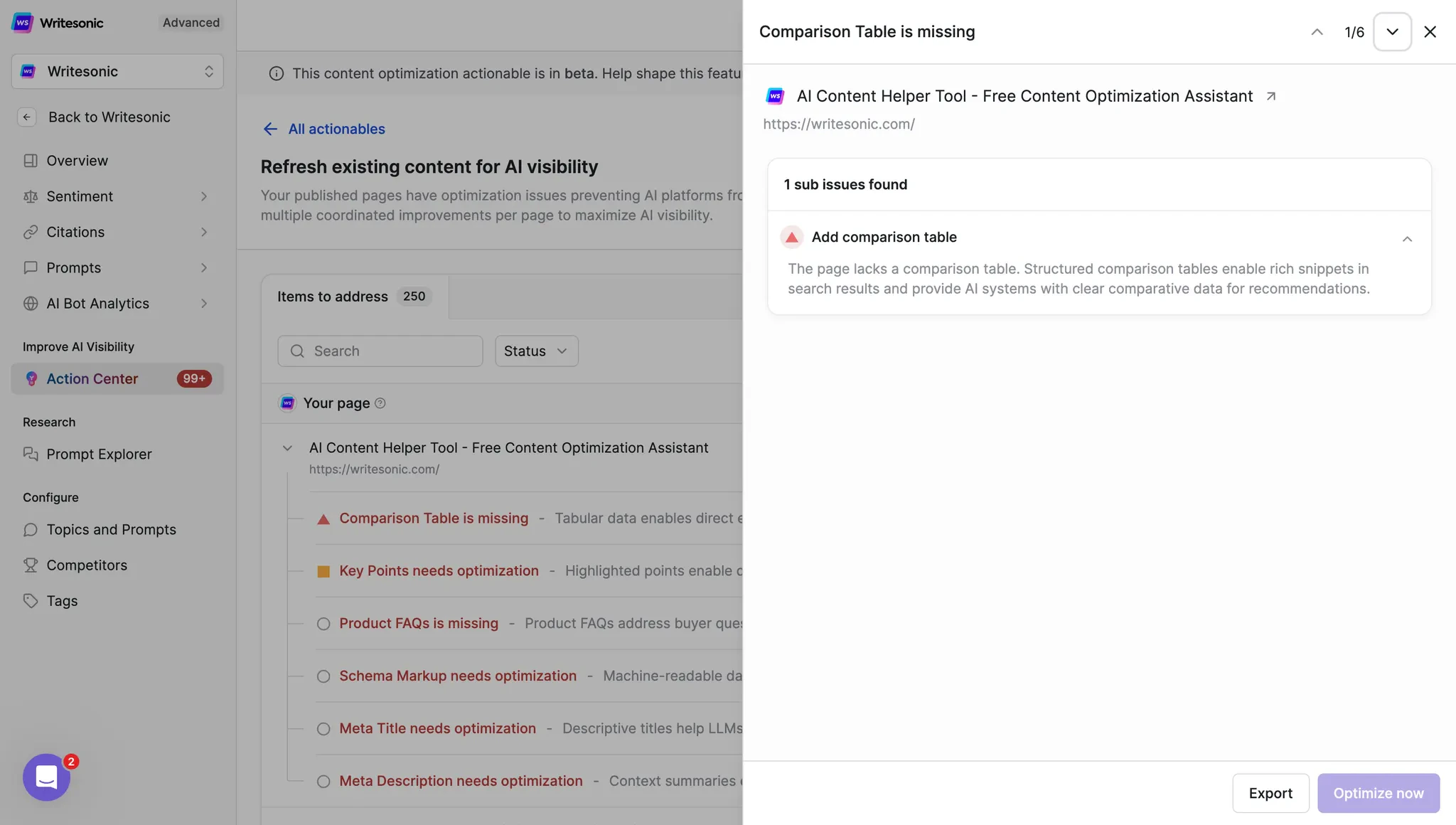
Comparison Table is Missing
When you see “Comparison Table is missing - 1 issue” in the Action Center, it means your page lacks structured comparison data that AI systems need for generating recommendations. What this means: The page lacks a comparison table. Structured comparison tables enable rich snippets in search results and provide AI systems with clear comparative data for recommendations. What it checks:- Presence of tabular comparison data
- Table structure and accessibility
- Key comparison columns (pricing, features, pros/cons)
- Mobile responsiveness of tables
- Product/Service Name
- Pricing
- Key Features
- Pros
- Cons
- Best For (use case)
- User Rating
- Integration Options
Authority & Trust Signals
Missing/Irrelevant Expert Quotes
This finder checks whether your content includes contextually relevant expert quotes with proper credentials to boost E-E-A-T (Experience, Expertise, Authoritativeness, Trustworthiness) signals. What it checks:- Presence of at least one expert quote per 1,000 words
- Quote relevance to the specific topic
Missing Author Credentials
This finder verifies that content displays author information with professional credentials rather than generic attributions. What it checks:- Author name visibility and placement (preferably at top)
- Professional credentials and experience mentioned
- Author bio or author schema markup present
- Specific expertise related to content topic
Missing Brand Mention
This finder verifies that your brand name appears naturally within the content to establish ownership and enable AI source attribution. Why it matters: Without brand mentions, AI models may attribute your content to competitors or fail to build brand association with your expertise areas. How to implement: Naturally incorporate your brand when discussing unique features, case studies, or differentiators: “At Writesonic, we’ve found that…” or “Our Writesonic platform enables…”Technical & Schema Elements
Schema Markup Needs Optimization
When the Action Center shows “Schema Markup needs optimization - 1 issue”, it indicates missing or incomplete structured data that’s critical for AI understanding. Machine-readable data increases AI extraction accuracy by 3x. What it checks by content type: Articles (How-to, Listicle, News, etc.):- Article/BlogPosting: Basic article classification
- HowTo: Step-by-step guides with clear instructions
- NewsArticle: Time-sensitive news content
- TechArticle: Technical documentation and guides
- FAQPage: When FAQ section exists
- Product: Core product information and specifications
- Review: Individual customer reviews
- AggregateRating: Overall rating summary
- Offer: Pricing and availability
- Organization: Company information and credibility
- LocalBusiness: Location-based information
- Service: Service descriptions and categories
- BreadcrumbList: Site navigation hierarchy
- VideoObject: When video content is embedded
Meta Title Needs Optimization
When you see “Meta Title needs optimization - 4 issues” in the dashboard, it means multiple pages have titles that don’t effectively help LLMs match content to user queries. What it checks:- Title length (50-60 characters optimal)
- Title x content relevancy
- Fresh Indicator in the title is updated or not
Meta Description Needs Optimization
Seeing “Meta Description needs optimization - 5 issues” indicates multiple pages where context summaries aren’t enabling LLMs to assess content relevance faster. What it checks:- Description length (150-160 characters)
- Accurate content summary
- Freshness Indicator in the description is updated or not
Outdated dateModified
This finder flags when the dateModified property in your schema markup is older than 3 months. What it checks:- Last modification date in all schema types
- Consistency between claimed updates and actual content changes
- Alignment with temporal indicators in content
Instructional Content
Missing Step-by-Step Instructions (Free Tools/How-to Content)
This finder detects when instructional content lacks clear, numbered steps, reducing extraction for how-to featured snippets. What it checks:- Presence of numbered or bulleted steps
- Each step as a distinct, actionable item
- Logical sequence and completeness
- Self-contained instructions without external dependencies
- Click the “Upload” button in the top menu
- Select your CSV file (max 10MB)
- Choose delimiter type (comma, tab, or semicolon)
- Click “Process” and wait for results
- Download the cleaned file using the green “Download” button
Working with the Action Center
Prioritizing Optimizations
When you see multiple issues in your dashboard (e.g., “18 issues” total), prioritize based on:- Critical technical issues (Schema markup, FAQ mismatches)
- High-impact content issues (Title mismatches, missing comparison tables)
- Authority signals (Expert quotes, author credentials)
- Enhancements (Brand mentions, meta optimizations)
Using the Optimize Button
Each issue category has an “Optimize” button that:- Provides detailed issue breakdown by URL
- Offers specific fix recommendations
- Shows before/after examples
- Estimates citation improvement potential
Tracking Progress
The Action Center tracks:- Issues resolved over time
- Citation improvements from optimizations
- Competitive positioning changes
- AI visibility trends
Optimization Matrix by Content Type
Below is a comprehensive matrix showing which optimization finders apply to each content type:Frequently Asked Questions
Q: What does “Competing sites” section show?
A: This section displays competitors who are successfully getting cited by AI platforms for similar topics. It helps you understand what optimization standards you need to meet or exceed.Q: Which optimizations have the highest impact on AI visibility?
A: Based on the Action Center data, Schema markup, comparison tables, and key points optimization show the highest impact, with proper implementation increasing citation rates by 60-70%.Q: Can I export the optimization report?
A: Yes, click the “Export” button in the top-right corner to download a detailed CSV or PDF report with all issues, recommendations, and priority scores.Q: What happens when I click “Optimize” for an issue?
A: You’ll see:- Specific pages affected
- Detailed problem description
- Step-by-step fix instructions
- Examples of proper implementation
- Estimated impact on AI visibility
Q: Do all finders apply to every piece of content?
A: No, finders are intelligently applied based on your content type. The Action Center automatically detects your content type and only checks relevant optimizations.Q: What’s the difference between GEO and traditional SEO?
A: While SEO optimizes for search engine rankings, GEO focuses on AI model comprehension and citation. The Action Center specifically targets optimizations that help AI models understand and reference your content confidently.Q: Can Content Optimization help with AI hallucination issues?
A: Yes, by implementing clear structure, proper schema markup, and authoritative signals, you help AI models accurately understand and cite your content, reducing the likelihood of misrepresentation in AI-generated responses.Q: How does the “Answers citing your page” section work?
A: This section tracks when AI platforms actually cite your content in their responses. As you implement optimizations, you’ll see this number increase, providing direct ROI measurement.Get Started with Content Optimization
Ready to maximize your brand’s AI visibility? The Action Center’s Content Optimization feature provides a comprehensive roadmap to ensure your content ranks prominently in AI-generated responses. With clear issue identification, one-click optimization guidance, and competitive intelligence, you have everything needed to dominate AI search results in your industry. Access the Action Center in your Writesonic dashboard or contact your account manager to begin your GEO optimization journey today.Action Center: Actionables Prompt Explorer