> ## Documentation Index
> Fetch the complete documentation index at: https://apidocs.writesonic.com/llms.txt
> Use this file to discover all available pages before exploring further.
# Overview
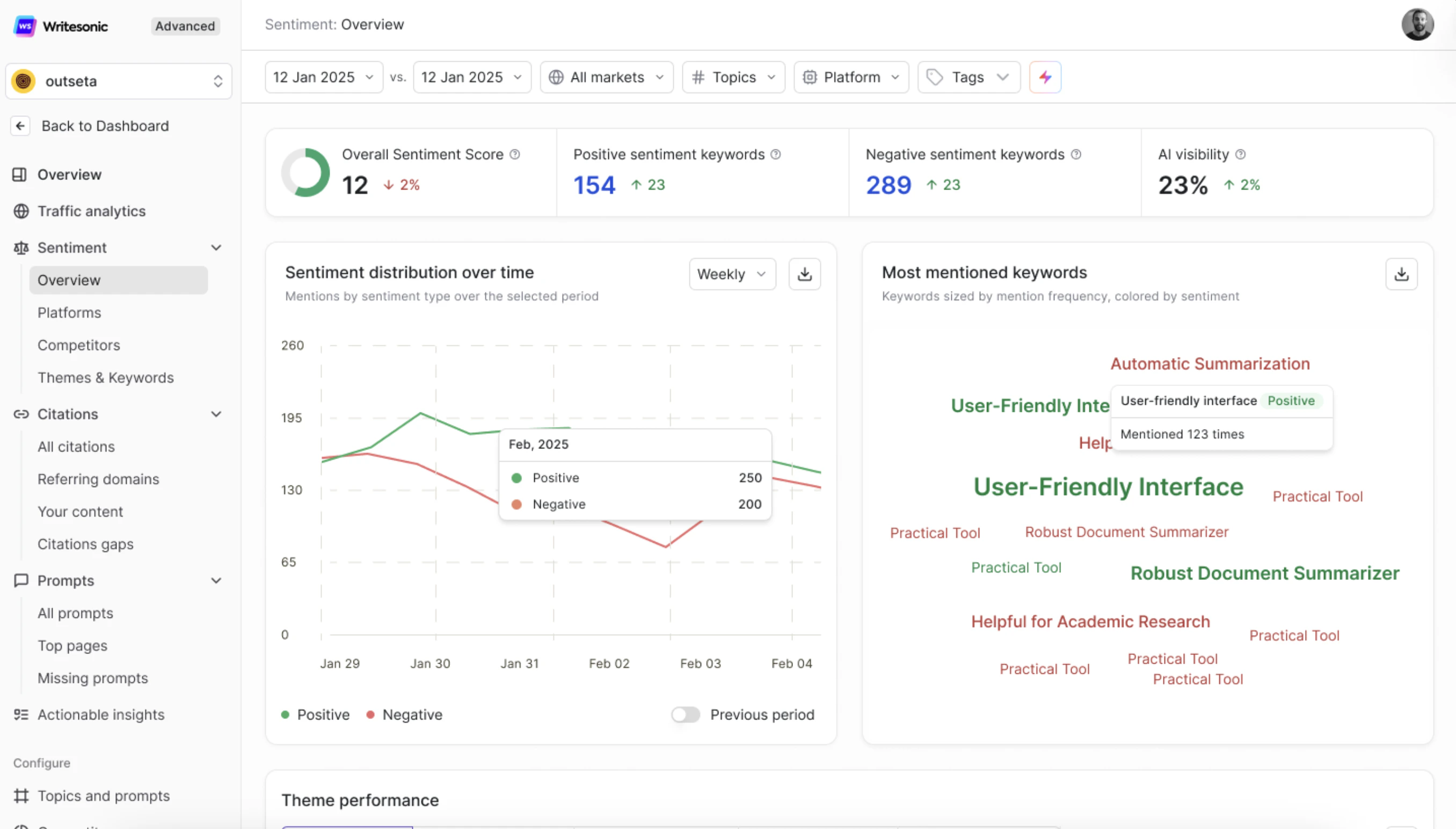
> The page is your central hub for understanding how AI search engines perceive and talk about your brand. It aggregates sentiment data from AI-generated responses across platforms like ChatGPT, Perplexity, Claude, Google AI Overviews, and others — giving you a clear picture of whether your brand is being described or when it appears in AI answers.
Think of it this way: visibility tells you \_**if your brand is mentioned**, but sentiment tells you \_**how it's mentioned**. A brand that's frequently mentioned but in a negative light may actually be worse off than one with fewer but positive mentions. This page helps you monitor, measure, and act on that distinction.
 ***
## Who Is This Page For?
* **Marketing & Brand teams** who want to monitor public perception of their brand in AI-generated content.
* **SEO & GEO specialists** tracking how sentiment shifts correlate with content updates and optimization efforts.
* **Enterprise teams** managing reputation across multiple markets, platforms, and product lines.
* **Executives & stakeholders** who need a quick, high-level read on brand health in the AI search landscape.
***
## Page-Level Filters
Before diving into the data, you can refine what you see using filters at the top of the page:
***
## Who Is This Page For?
* **Marketing & Brand teams** who want to monitor public perception of their brand in AI-generated content.
* **SEO & GEO specialists** tracking how sentiment shifts correlate with content updates and optimization efforts.
* **Enterprise teams** managing reputation across multiple markets, platforms, and product lines.
* **Executives & stakeholders** who need a quick, high-level read on brand health in the AI search landscape.
***
## Page-Level Filters
Before diving into the data, you can refine what you see using filters at the top of the page:
 * **Date range selector** — Choose and compare two time periods (e.g., *12 Jan 2025 vs. 12 Jan 2025*) to track how sentiment has shifted over time.
* **Markets** — Filter by the geographic region/market you're tracking (e.g., *All markets* or a specific country).
* **Topics** — Narrow down to specific topics configured during your GEO setup.
* **Platform** — View sentiment from a specific AI platform (e.g., ChatGPT, Perplexity, Google AI Overviews) or across all platforms.
* **Tags** — Apply custom tags to segment and filter your sentiment data further.
These filters let you isolate exactly the data you need — whether you're looking at a specific market, a particular AI platform, or a narrow topic area.
***
## Key Metrics (Summary Cards)
At the top of the page, you'll see four high-level metrics that give you an instant snapshot of your brand's sentiment health:
* **Date range selector** — Choose and compare two time periods (e.g., *12 Jan 2025 vs. 12 Jan 2025*) to track how sentiment has shifted over time.
* **Markets** — Filter by the geographic region/market you're tracking (e.g., *All markets* or a specific country).
* **Topics** — Narrow down to specific topics configured during your GEO setup.
* **Platform** — View sentiment from a specific AI platform (e.g., ChatGPT, Perplexity, Google AI Overviews) or across all platforms.
* **Tags** — Apply custom tags to segment and filter your sentiment data further.
These filters let you isolate exactly the data you need — whether you're looking at a specific market, a particular AI platform, or a narrow topic area.
***
## Key Metrics (Summary Cards)
At the top of the page, you'll see four high-level metrics that give you an instant snapshot of your brand's sentiment health:
 ### Overall Sentiment Score
A **single numeric score** that represents the net sentiment of your brand across all tracked AI answers. This score accounts for both positive and negative mentions and provides a quick health check.
* A **higher score** means AI platforms are describing your brand more favorably.
* A **declining score** (indicated by a red percentage change) signals that negative mentions may be increasing or positive ones are dropping.
* Use this as your **primary sentiment KPI** when reporting to stakeholders.
### Positive Sentiment Keywords
The **total count of keywords** associated with positive sentiment about your brand. These are the terms AI engines are using in a favorable context when mentioning your brand.
* An **upward trend** here means AI platforms are associating more positive language with your brand.
* Monitor this alongside your content and PR efforts to see what's driving positive perception.
### Negative Sentiment Keywords
The **total count of keywords** tied to negative sentiment. These keywords appear in AI responses where your brand is discussed in a less favorable or critical tone.
* An **increasing count** here is a signal to investigate which themes or topics are driving negativity.
* Cross-reference with the **Theme Performance** section (below) to pinpoint specific problem areas.
### AI Visibility
Your brand's **overall AI visibility percentage** — the share of tracked AI responses that mention your brand. While not exclusively a sentiment metric, it provides critical context: sentiment data is only meaningful if your brand has enough visibility for it to matter.
* A **rising visibility paired with positive sentiment** is the ideal scenario.
* **Rising visibility with increasing negative sentiment** needs immediate attention — more people are seeing unfavorable mentions.
***
## Sentiment Distribution Over Time
This chart visualizes how **positive and negative mentions** trend across your selected date range. It displays sentiment volume on a **weekly** (or custom) basis, allowing you to spot patterns, spikes, and dips.
### Overall Sentiment Score
A **single numeric score** that represents the net sentiment of your brand across all tracked AI answers. This score accounts for both positive and negative mentions and provides a quick health check.
* A **higher score** means AI platforms are describing your brand more favorably.
* A **declining score** (indicated by a red percentage change) signals that negative mentions may be increasing or positive ones are dropping.
* Use this as your **primary sentiment KPI** when reporting to stakeholders.
### Positive Sentiment Keywords
The **total count of keywords** associated with positive sentiment about your brand. These are the terms AI engines are using in a favorable context when mentioning your brand.
* An **upward trend** here means AI platforms are associating more positive language with your brand.
* Monitor this alongside your content and PR efforts to see what's driving positive perception.
### Negative Sentiment Keywords
The **total count of keywords** tied to negative sentiment. These keywords appear in AI responses where your brand is discussed in a less favorable or critical tone.
* An **increasing count** here is a signal to investigate which themes or topics are driving negativity.
* Cross-reference with the **Theme Performance** section (below) to pinpoint specific problem areas.
### AI Visibility
Your brand's **overall AI visibility percentage** — the share of tracked AI responses that mention your brand. While not exclusively a sentiment metric, it provides critical context: sentiment data is only meaningful if your brand has enough visibility for it to matter.
* A **rising visibility paired with positive sentiment** is the ideal scenario.
* **Rising visibility with increasing negative sentiment** needs immediate attention — more people are seeing unfavorable mentions.
***
## Sentiment Distribution Over Time
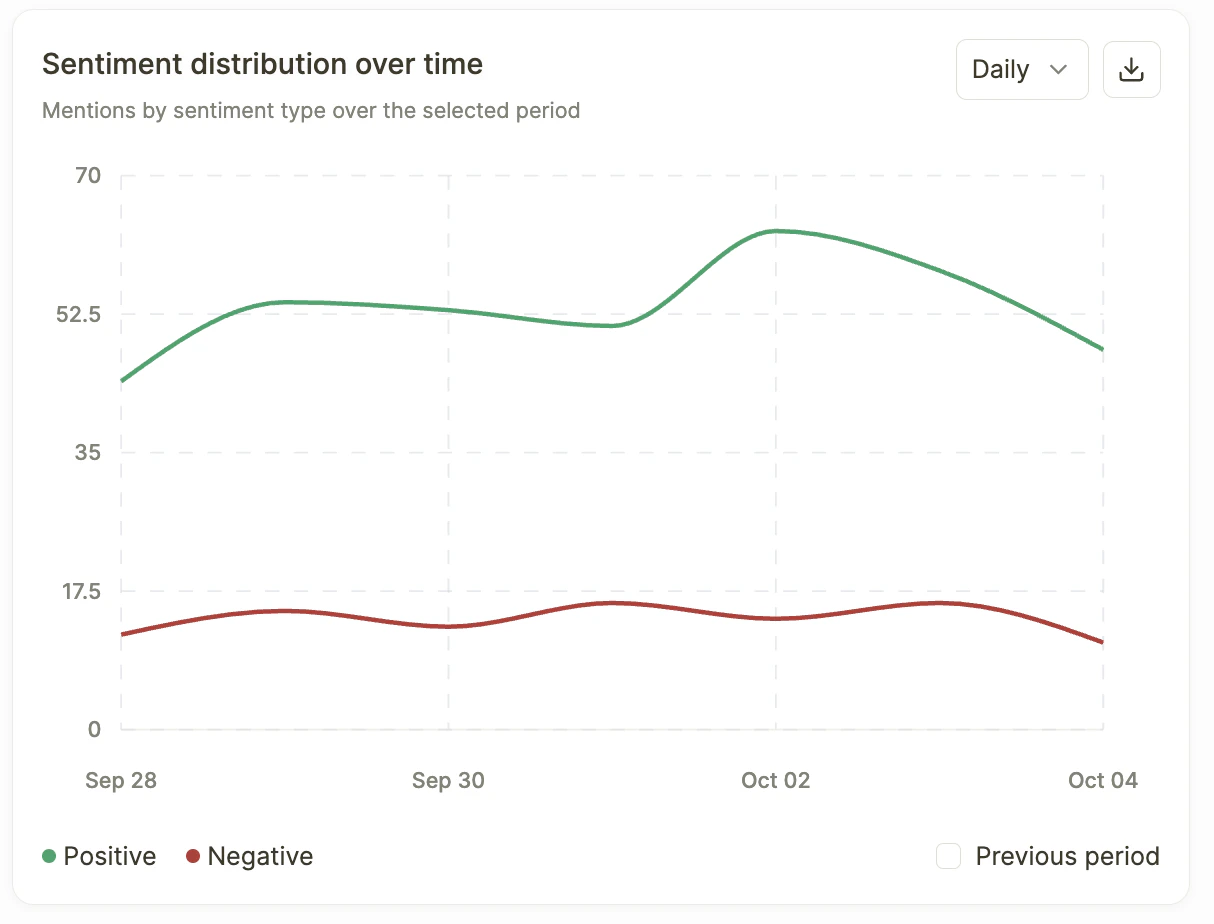
This chart visualizes how **positive and negative mentions** trend across your selected date range. It displays sentiment volume on a **weekly** (or custom) basis, allowing you to spot patterns, spikes, and dips.
 **What to look for:**
* **Consistent green (positive) above red (negative)** — Healthy brand perception. AI platforms are talking about you favorably.
* **Spikes in negative sentiment** — Could indicate a product issue, a competitor campaign, or negative press that AI engines have picked up.
* **Crossover points** — When negative sentiment overtakes positive, this is a critical moment that warrants investigation.
* **Previous period comparison toggle** — Enable this to overlay a prior time period and see how sentiment has improved or declined.
**How to use it:**
* Correlate sentiment shifts with your own marketing activities, product launches, or industry events.
* If you see a spike in negative sentiment, drill down into the **Theme Performance** table (below) to identify which specific themes are driving it.
* Export the chart data using the **download icon** for use in reports or presentations.
***
## Most Mentioned Keywords
A **word cloud** that visualizes the keywords most frequently associated with your brand across AI responses, sized by **mention frequency** and colored by **sentiment**.
**What to look for:**
* **Consistent green (positive) above red (negative)** — Healthy brand perception. AI platforms are talking about you favorably.
* **Spikes in negative sentiment** — Could indicate a product issue, a competitor campaign, or negative press that AI engines have picked up.
* **Crossover points** — When negative sentiment overtakes positive, this is a critical moment that warrants investigation.
* **Previous period comparison toggle** — Enable this to overlay a prior time period and see how sentiment has improved or declined.
**How to use it:**
* Correlate sentiment shifts with your own marketing activities, product launches, or industry events.
* If you see a spike in negative sentiment, drill down into the **Theme Performance** table (below) to identify which specific themes are driving it.
* Export the chart data using the **download icon** for use in reports or presentations.
***
## Most Mentioned Keywords
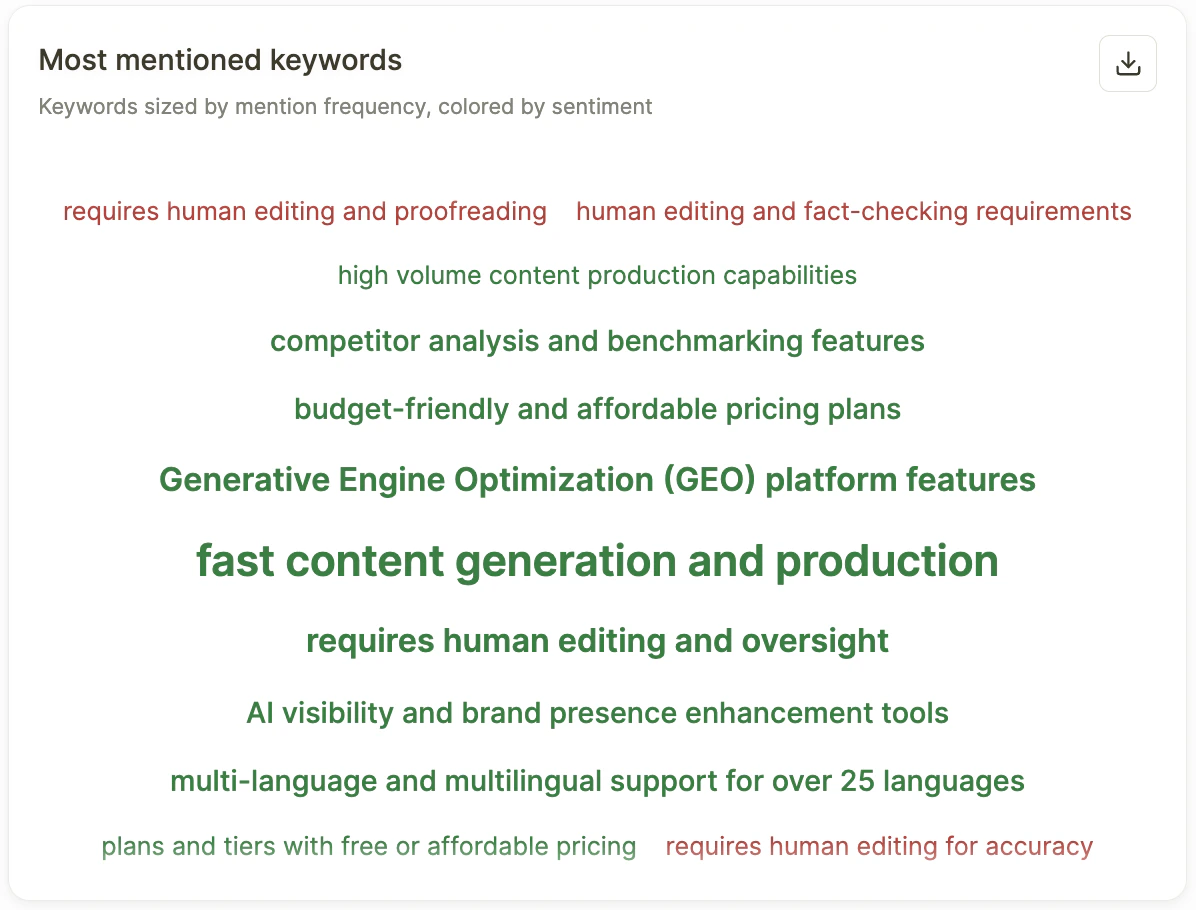
A **word cloud** that visualizes the keywords most frequently associated with your brand across AI responses, sized by **mention frequency** and colored by **sentiment**.
 **How it works:**
* **Larger keywords** appear more frequently in AI-generated answers about your brand.
* **Color coding** indicates sentiment — keywords in positive sentiment are visually distinguished from those in negative sentiment.
* **Hover over any keyword** to see the exact mention count and its sentiment classification (e.g., *"User-friendly interface — Positive — Mentioned 123 times"*).
**Why it matters:**
* Quickly identify the **dominant narratives** AI engines are building around your brand.
* Spot **emerging keywords** — new terms appearing in the cloud may signal shifting perception.
* If negative keywords are growing larger (more frequent), it's a sign you need to address the underlying issues in your content or product experience.
***
## Theme Performance
The **Theme Performance** section is the most actionable part of the Sentiment Overview page. It breaks down your brand's sentiment into **recurring themes** — the topics and patterns that AI platforms consistently associate with your brand.
**How it works:**
* **Larger keywords** appear more frequently in AI-generated answers about your brand.
* **Color coding** indicates sentiment — keywords in positive sentiment are visually distinguished from those in negative sentiment.
* **Hover over any keyword** to see the exact mention count and its sentiment classification (e.g., *"User-friendly interface — Positive — Mentioned 123 times"*).
**Why it matters:**
* Quickly identify the **dominant narratives** AI engines are building around your brand.
* Spot **emerging keywords** — new terms appearing in the cloud may signal shifting perception.
* If negative keywords are growing larger (more frequent), it's a sign you need to address the underlying issues in your content or product experience.
***
## Theme Performance
The **Theme Performance** section is the most actionable part of the Sentiment Overview page. It breaks down your brand's sentiment into **recurring themes** — the topics and patterns that AI platforms consistently associate with your brand.
 ### Tab Navigation
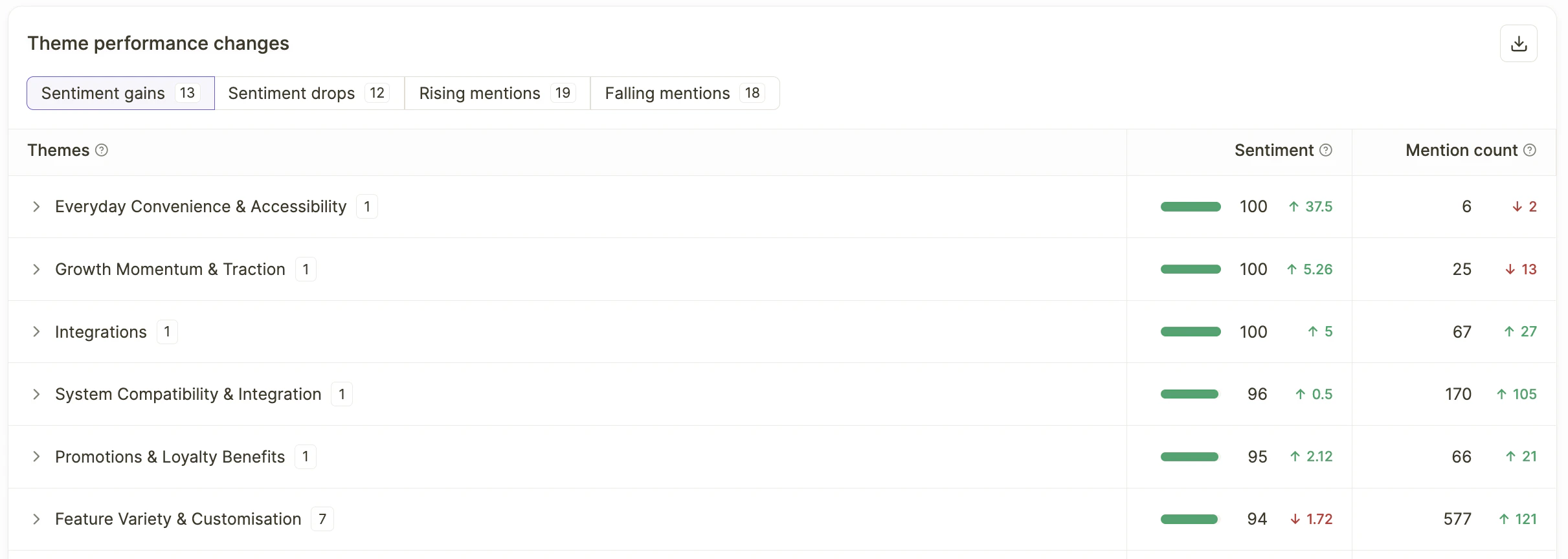
The section is organized into five tabs, each showing a count of themes:
* **Top Themes** — The most frequently mentioned themes across all AI responses. These represent the core narratives AI engines are building around your brand.
* **Sentiment Gains** — Themes where positive sentiment has **increased** compared to the previous period. These are your wins.
* **Sentiment Drops** — Themes where sentiment has **declined**. These need attention and potentially a targeted content or messaging response.
* **Rising Mentions** — Themes that are being mentioned **more frequently**, regardless of sentiment. Useful for spotting trending topics.
* **Falling Mentions** — Themes that are **losing traction** in AI responses. Could indicate decreasing relevance or shifting AI platform focus.
### Theme Table
Each theme in the table includes:
* **Theme name** — The specific topic or pattern (e.g., *Intuitive user interface*, *Responsive design*, *Seamless integration*).
* **Sentiment score** — A numeric score with a visual bar showing the positive-to-negative ratio. Higher scores (with green bars) indicate more positive sentiment; lower scores (with red indicators) signal predominantly negative sentiment.
* **Sentiment change indicator** — An arrow showing whether sentiment has improved (↑) or declined since the previous period.
* **Mention count** — How many times this theme appeared in AI responses during the selected period.
* **Mention change indicator** — An arrow showing whether mentions are increasing (↑) or decreasing (↓) compared to the prior period.
### Expandable Sub-Themes
Click the **expand arrow (>)** next to any theme to reveal its **sub-themes** — the specific keywords and phrases that make up that broader theme. Each sub-theme shows its own sentiment score and mention count, giving you granular visibility into what's driving the overall theme's performance.
For example, expanding *"Seamless integration"* might reveal sub-themes like:
* *User-friendly interface*
* *Quick load times*
* *Comprehensive documentation*
* *Frequent updates*
This drill-down helps you understand not just *what* AI is saying, but the **specific attributes** driving positive or negative perception.
### How to Use Theme Performance
* **Prioritize themes with high mentions and declining sentiment** — These are high-impact areas where negative perception is spreading at scale.
* **Double down on themes with sentiment gains** — Identify what you're doing right and amplify it in your content strategy.
* **Investigate rising mentions with low sentiment scores** — A theme gaining traction for the wrong reasons needs a swift content or messaging response.
* **Use falling mentions as a signal** — If a previously strong theme is losing mentions, refresh the associated content to keep it relevant.
***
## Best Practices for Using Sentiment: Overview
* **Check weekly.** Sentiment shifts can happen fast, especially after product updates, PR events, or competitor activity. A weekly review cadence helps you catch changes early.
* **Pair sentiment with visibility.** A sentiment score in isolation doesn't tell the full story. Always consider it alongside your AI visibility metrics — high visibility with poor sentiment is more damaging than low visibility.
* **Use filters strategically.** Don't just look at the aggregate. Filter by platform to see if sentiment issues are platform-specific (e.g., poor sentiment on ChatGPT but positive on Perplexity). Filter by topic to isolate which product areas are driving negative perception.
* **Act on Theme Performance.** The theme table is your most actionable tool. Use it to brief content teams, inform product messaging, and identify specific areas for improvement.
* **Export and share.** Use the download icons on charts and tables to pull data into reports and presentations for stakeholders.
***
***
[Overview: Platforms](/docs/overview-platforms)
[Sentiment: Themes and Keywords](/docs/all-themes)
### Tab Navigation
The section is organized into five tabs, each showing a count of themes:
* **Top Themes** — The most frequently mentioned themes across all AI responses. These represent the core narratives AI engines are building around your brand.
* **Sentiment Gains** — Themes where positive sentiment has **increased** compared to the previous period. These are your wins.
* **Sentiment Drops** — Themes where sentiment has **declined**. These need attention and potentially a targeted content or messaging response.
* **Rising Mentions** — Themes that are being mentioned **more frequently**, regardless of sentiment. Useful for spotting trending topics.
* **Falling Mentions** — Themes that are **losing traction** in AI responses. Could indicate decreasing relevance or shifting AI platform focus.
### Theme Table
Each theme in the table includes:
* **Theme name** — The specific topic or pattern (e.g., *Intuitive user interface*, *Responsive design*, *Seamless integration*).
* **Sentiment score** — A numeric score with a visual bar showing the positive-to-negative ratio. Higher scores (with green bars) indicate more positive sentiment; lower scores (with red indicators) signal predominantly negative sentiment.
* **Sentiment change indicator** — An arrow showing whether sentiment has improved (↑) or declined since the previous period.
* **Mention count** — How many times this theme appeared in AI responses during the selected period.
* **Mention change indicator** — An arrow showing whether mentions are increasing (↑) or decreasing (↓) compared to the prior period.
### Expandable Sub-Themes
Click the **expand arrow (>)** next to any theme to reveal its **sub-themes** — the specific keywords and phrases that make up that broader theme. Each sub-theme shows its own sentiment score and mention count, giving you granular visibility into what's driving the overall theme's performance.
For example, expanding *"Seamless integration"* might reveal sub-themes like:
* *User-friendly interface*
* *Quick load times*
* *Comprehensive documentation*
* *Frequent updates*
This drill-down helps you understand not just *what* AI is saying, but the **specific attributes** driving positive or negative perception.
### How to Use Theme Performance
* **Prioritize themes with high mentions and declining sentiment** — These are high-impact areas where negative perception is spreading at scale.
* **Double down on themes with sentiment gains** — Identify what you're doing right and amplify it in your content strategy.
* **Investigate rising mentions with low sentiment scores** — A theme gaining traction for the wrong reasons needs a swift content or messaging response.
* **Use falling mentions as a signal** — If a previously strong theme is losing mentions, refresh the associated content to keep it relevant.
***
## Best Practices for Using Sentiment: Overview
* **Check weekly.** Sentiment shifts can happen fast, especially after product updates, PR events, or competitor activity. A weekly review cadence helps you catch changes early.
* **Pair sentiment with visibility.** A sentiment score in isolation doesn't tell the full story. Always consider it alongside your AI visibility metrics — high visibility with poor sentiment is more damaging than low visibility.
* **Use filters strategically.** Don't just look at the aggregate. Filter by platform to see if sentiment issues are platform-specific (e.g., poor sentiment on ChatGPT but positive on Perplexity). Filter by topic to isolate which product areas are driving negative perception.
* **Act on Theme Performance.** The theme table is your most actionable tool. Use it to brief content teams, inform product messaging, and identify specific areas for improvement.
* **Export and share.** Use the download icons on charts and tables to pull data into reports and presentations for stakeholders.
***
***
[Overview: Platforms](/docs/overview-platforms)
[Sentiment: Themes and Keywords](/docs/all-themes)