> ## Documentation Index
> Fetch the complete documentation index at: https://apidocs.writesonic.com/llms.txt
> Use this file to discover all available pages before exploring further.
# Brand Kit
> Brand Kit gives every agent the same standing business, audience, voice, content, and design context on every task.
Your Brand Kit is the **standing context** every agent reads before working on a task. You define it once, then update it when your business, audience, or standards change.
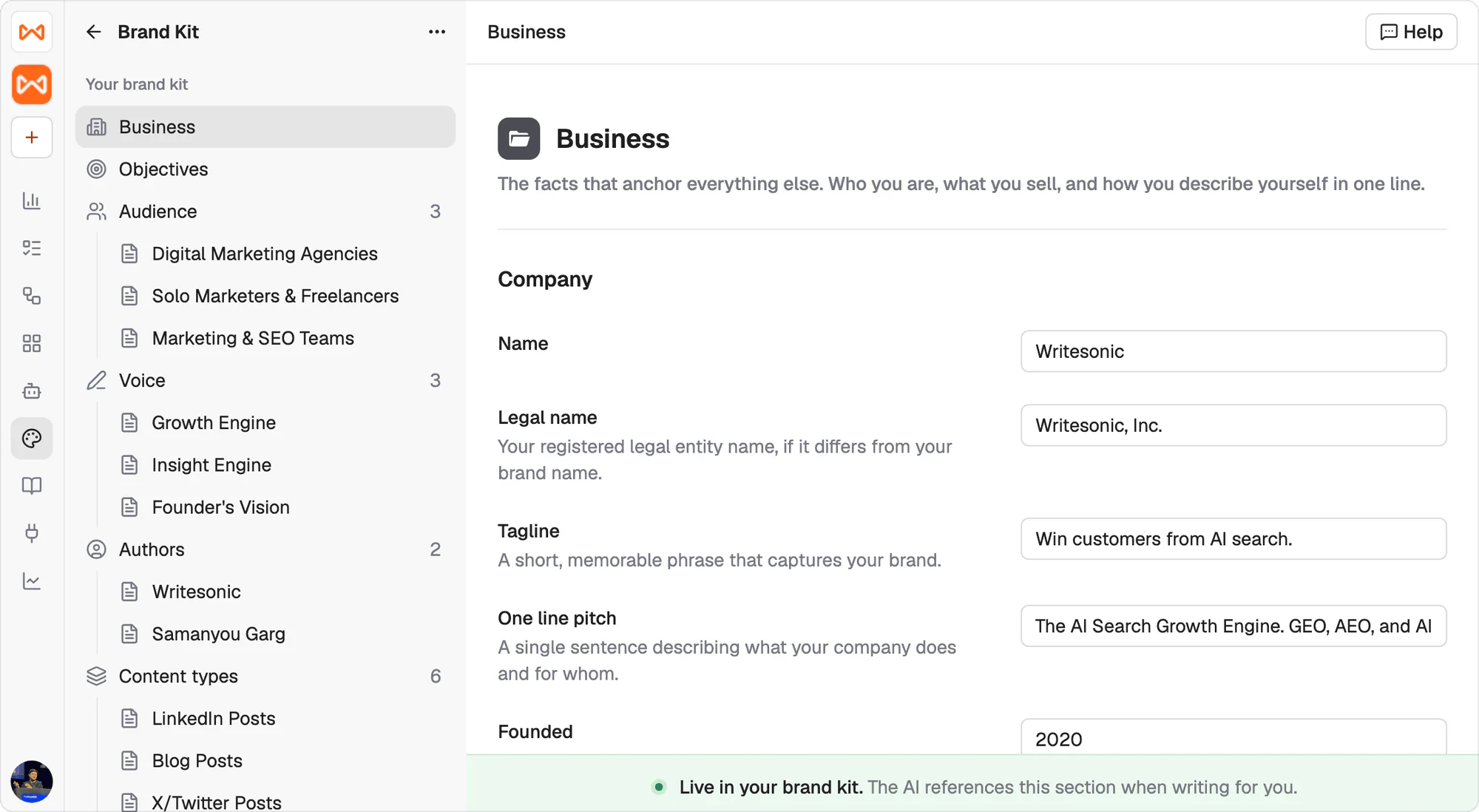 ## Every agent starts from the same brand context
A task brief should explain the work you need now. It shouldn't have to repeat your company background, audience, voice, author details, format rules, or design direction.
The Brand Kit keeps those instructions in one shared place. Business, Objectives, and Design are single documents. Audience, Voice, Authors, and Content types can each hold multiple named entries, so the relevant options can coexist without being blended into one generic profile.
At the bottom of every section, a green bar confirms how that context is used:
> Live in your brand kit. The AI references this section when writing for you.
That context remains available across tasks and agents.
## We build the first version from what you already have
You won't be left with an empty form to fill in section by section. We generate the starting point from one of two sources.
1. **Your live website.** Give us your URL and we infer the Brand Kit and the design kit from the site. This captures the brand you've already published, in the language and visual direction your customers see today.
2. **Your existing brand guidelines.** Send us the documents your team already uses, PDF or DOC. We turn that material into the matching sections.
Your website reflects what is live. Your guideline documents often carry standards and distinctions that never made it onto the site. Pick whichever better represents the brand you want agents to follow.
## Nothing counts until you approve it
Everything we generate arrives as a **draft**. The Brand Kit opens on a review screen that tells you how many drafts are waiting and how many you've approved, and the sidebar carries a percent-complete bar until you're through them.
## Every agent starts from the same brand context
A task brief should explain the work you need now. It shouldn't have to repeat your company background, audience, voice, author details, format rules, or design direction.
The Brand Kit keeps those instructions in one shared place. Business, Objectives, and Design are single documents. Audience, Voice, Authors, and Content types can each hold multiple named entries, so the relevant options can coexist without being blended into one generic profile.
At the bottom of every section, a green bar confirms how that context is used:
> Live in your brand kit. The AI references this section when writing for you.
That context remains available across tasks and agents.
## We build the first version from what you already have
You won't be left with an empty form to fill in section by section. We generate the starting point from one of two sources.
1. **Your live website.** Give us your URL and we infer the Brand Kit and the design kit from the site. This captures the brand you've already published, in the language and visual direction your customers see today.
2. **Your existing brand guidelines.** Send us the documents your team already uses, PDF or DOC. We turn that material into the matching sections.
Your website reflects what is live. Your guideline documents often carry standards and distinctions that never made it onto the site. Pick whichever better represents the brand you want agents to follow.
## Nothing counts until you approve it
Everything we generate arrives as a **draft**. The Brand Kit opens on a review screen that tells you how many drafts are waiting and how many you've approved, and the sidebar carries a percent-complete bar until you're through them.
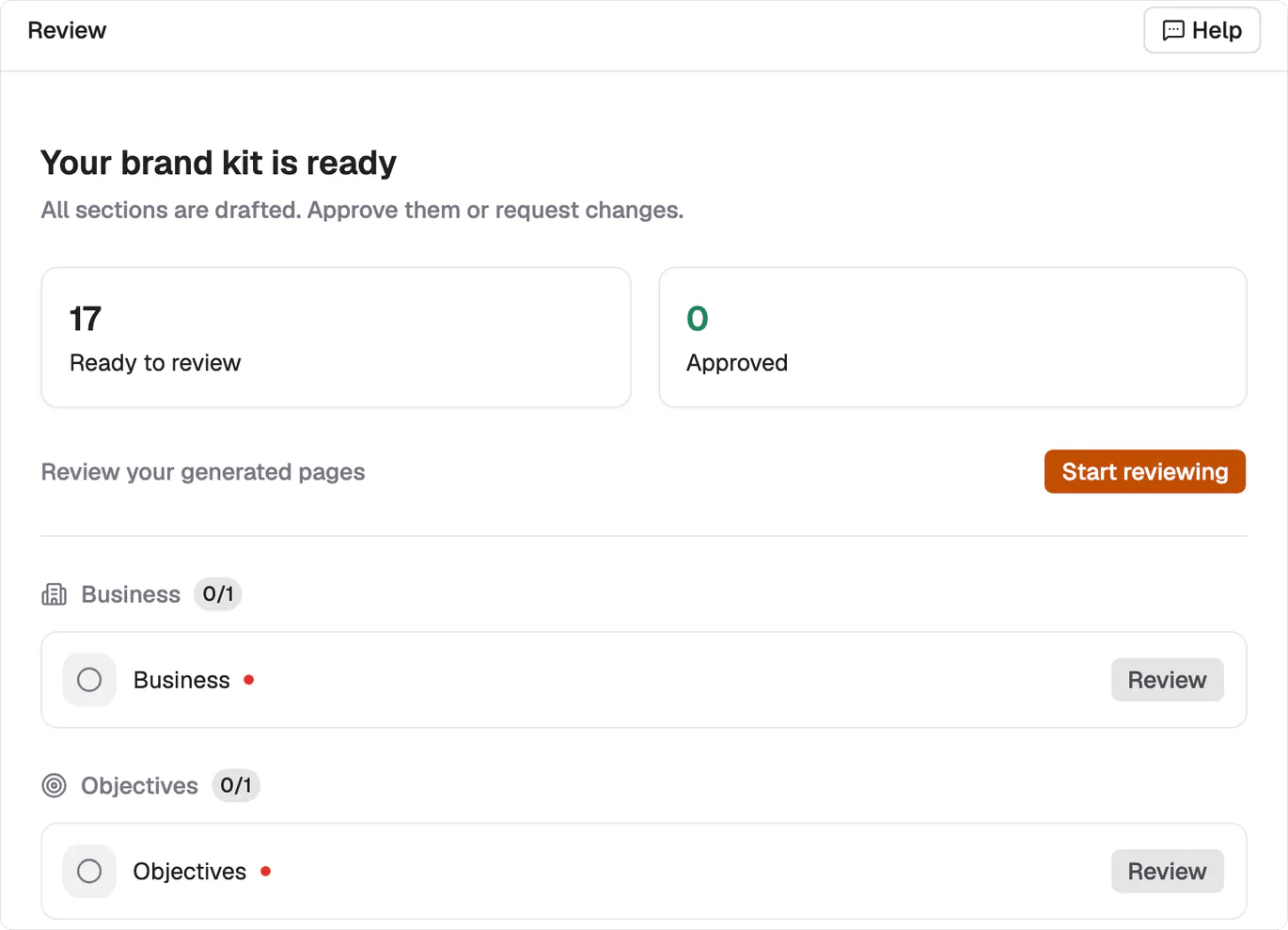 **Start reviewing** walks them one at a time. Read the draft, then **Approve and Next** to accept it, or **Edit with AI** to say what's wrong and have it redrafted. A counter tracks where you are in the run.
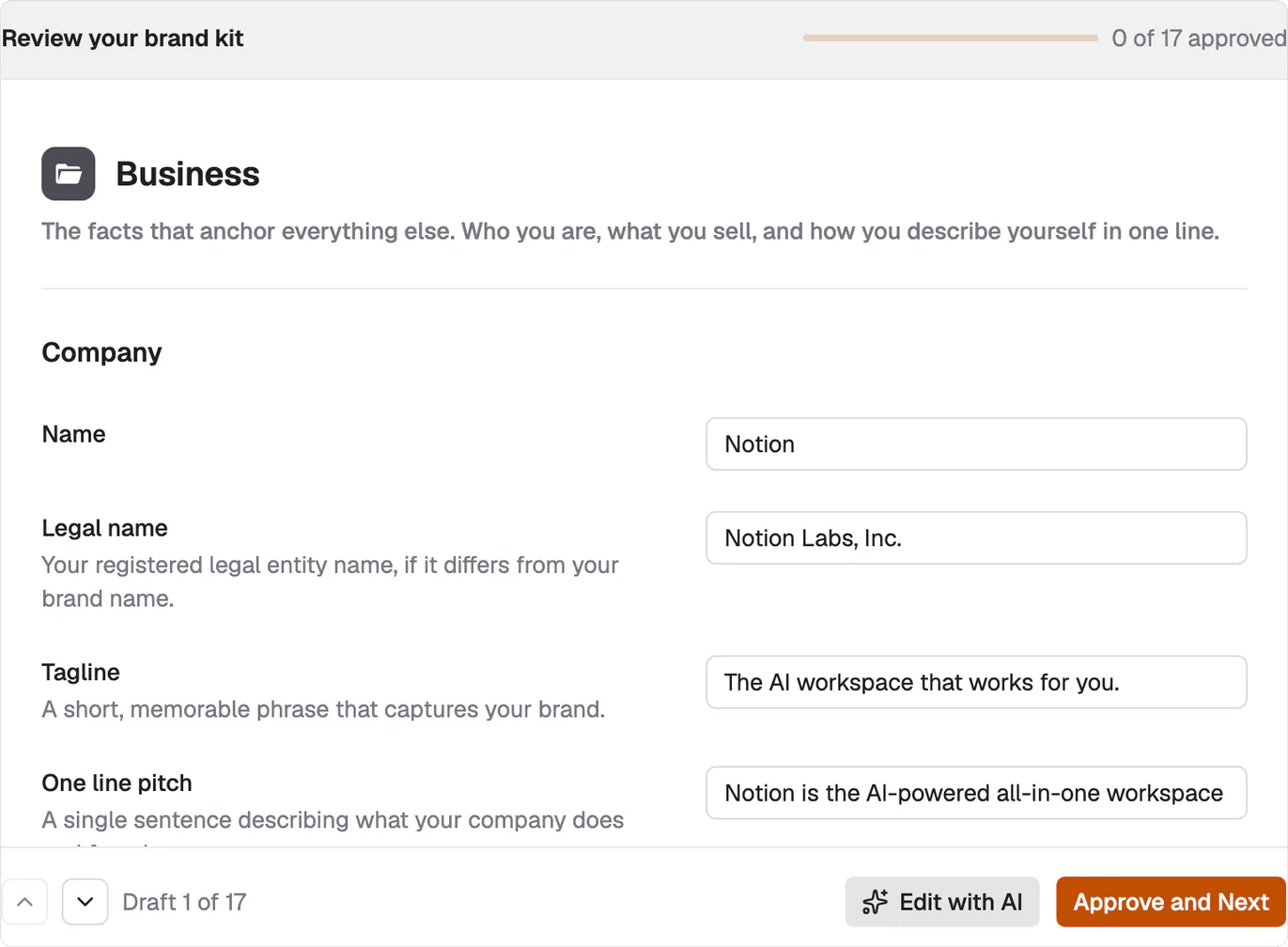 Work through the whole set before you assign real work. An unapproved section still reads as your brand to an agent, and a generated guess that nobody checked is the one thing that shows up in the output.
## Each Brand Kit section has its own page
Use these pages when you need to review or refine a specific part of the shared context.
| Section | What it sets |
| ---------------------------------------------------------- | -------------------------------------------------------------------------------- |
| [Business and objectives](/agents/brand-kit-business) | Your facts, products and positioning, and the goals the work is measured against |
| [Audiences and voices](/agents/brand-kit-audiences-voices) | Who a piece is written for, and which of your voices it's written in |
| [Authors](/agents/brand-kit-authors) | The byline, its credentials, and what that author is allowed to say |
| [Content types](/agents/brand-kit-content-types) | The length, structure and formatting rules for each thing you publish |
| [Design](/agents/brand-kit-design) | The written visual system the Design agent builds from |
## Task tags can focus or override the standing context
The Brand Kit supplies the default. A particular task may need one audience, a specific author, or guidance that differs from the usual standard.
In those cases, you can [tag context into the task](/agents/tagging-context) to focus the agent on the relevant entry or override the default for that piece of work. The underlying Brand Kit remains unchanged for future tasks.
## What's next
Define the brand and people who can receive attribution.
Give agents the source material they can use in their work.
Work through the whole set before you assign real work. An unapproved section still reads as your brand to an agent, and a generated guess that nobody checked is the one thing that shows up in the output.
## Each Brand Kit section has its own page
Use these pages when you need to review or refine a specific part of the shared context.
| Section | What it sets |
| ---------------------------------------------------------- | -------------------------------------------------------------------------------- |
| [Business and objectives](/agents/brand-kit-business) | Your facts, products and positioning, and the goals the work is measured against |
| [Audiences and voices](/agents/brand-kit-audiences-voices) | Who a piece is written for, and which of your voices it's written in |
| [Authors](/agents/brand-kit-authors) | The byline, its credentials, and what that author is allowed to say |
| [Content types](/agents/brand-kit-content-types) | The length, structure and formatting rules for each thing you publish |
| [Design](/agents/brand-kit-design) | The written visual system the Design agent builds from |
## Task tags can focus or override the standing context
The Brand Kit supplies the default. A particular task may need one audience, a specific author, or guidance that differs from the usual standard.
In those cases, you can [tag context into the task](/agents/tagging-context) to focus the agent on the relevant entry or override the default for that piece of work. The underlying Brand Kit remains unchanged for future tasks.
## What's next
Define the brand and people who can receive attribution.
Give agents the source material they can use in their work.