> ## Documentation Index
> Fetch the complete documentation index at: https://apidocs.writesonic.com/llms.txt
> Use this file to discover all available pages before exploring further.
# Playbook library
> The playbooks that ship with Agents, what each one does, and which are still in beta.
A set of playbooks ships ready to run. Running one on real input is the fastest way to understand what a playbook is, and it saves you describing a workflow that already exists.
## Open the Templates tab to see them
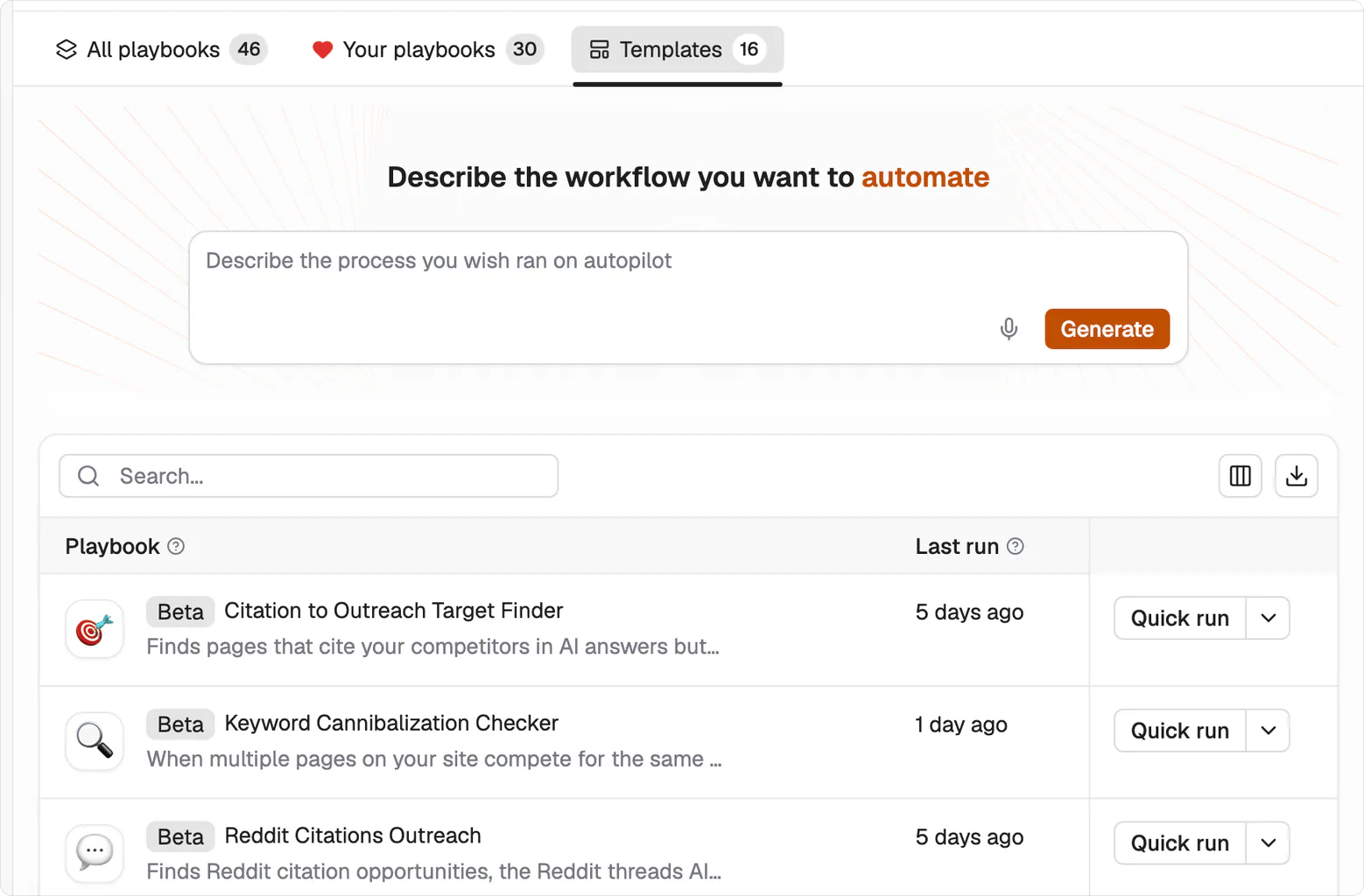
Playbooks splits into three tabs. **All playbooks** is everything available to you, **Your playbooks** is what your workspace has built, and **Templates** is what ships with the product. The tab shows the count for your workspace.
The list shows ten at a time, so use the pagination at the bottom to reach the rest.
 ## What each one does
Most of them carry a **Beta** badge. Beta playbooks run normally. The badge means the steps are still being tuned, so read the output before you trust it at volume.
### Write and publish
| Playbook | What it does | |
| -------------------------------- | --------------------------------------------------------------------------------------------------------------- | ---- |
| Article Generation v10 | The full pipeline: competitor analysis, keyword curation, title, outline, research, writing, review and editing | Beta |
| YouTube to Blog | Turns a video into an SEO-optimized post, with keyword research, meta tags and a featured image | |
| Translate Content | Translates one piece of content into a target language, with optional style matching and preservation rules | Beta |
| Humanize Content | Rewrites AI-generated content to read naturally, preserving formatting and links | Beta |
| Get Hero Stock Image for Article | Reads an article and generates a hero image from its content | Beta |
### Improve pages you already have
| Playbook | What it does | |
| ---------------------- | ----------------------------------------------------------------------------------------------------- | ---- |
| Bulk Content Optimizer | Recommendations for many pages at once, exported as a CSV | Beta |
| Meta Tags Optimizer | Rewrites meta title and description for a URL, using page-type-aware SEO and GEO rules | Beta |
| Schema Generator | Generates JSON-LD structured data for a page, with page-type-specific guidelines | Beta |
| Internal Link Builder | Inserts internal links into a Markdown article by finding relevant pages on your domain | Beta |
| FAQ Suggester v2 | Generates FAQs from an article URL, and waits for your review before creating schema markup | |
| FAQ Suggester | The earlier version. Pulls People Also Ask, researches Reddit and Quora, and returns FAQs with schema | |
### Diagnose
| Playbook | What it does | |
| ------------------------------- | --------------------------------------------------------------------------------------------------------------------------------------- | ---- |
| Keyword Cannibalization Checker | Finds which of your pages compete for the same keyword, analyzes the conflict, and says whether publishing more on that keyword is safe | Beta |
| Analyze SERP for Target Keyword | Reads the search results for a keyword, tracks your domain in them, and returns recommendations | Beta |
### Win citations off your own site
| Playbook | What it does | |
| ---------------------------------- | ------------------------------------------------------------------------------------------------------------------------------------------------------------ | ---- |
| Citation to Outreach Target Finder | Finds pages cited in AI answers that mention competitors but not you, resolves the author's contact details, scores each lead, and drafts the outreach email | Beta |
| Reddit Citations Outreach | Finds the Reddit threads AI assistants cite for your project, analyzes each one, and drafts a comment | Beta |
### Research
| Playbook | What it does | |
| ----------------------------------- | ------------------------------------------------------------------------- | - |
| Ecommerce Product Review Summariser | Summarizes product reviews for a brand across e-commerce sites and Reddit | |
## Running one
Each row has a **Quick run** action, which takes one input and returns one result. Open the playbook itself and you get the same thing as **Single run**, alongside **Create grid** for running it across many rows at once. The playbook's own screen also keeps its run history, so you can see how previous runs ended before you commit to a large one.
Start with Quick run on real input. A template you've watched work once is a template you can safely put in a [grid](/agents/grids).
## What each one does
Most of them carry a **Beta** badge. Beta playbooks run normally. The badge means the steps are still being tuned, so read the output before you trust it at volume.
### Write and publish
| Playbook | What it does | |
| -------------------------------- | --------------------------------------------------------------------------------------------------------------- | ---- |
| Article Generation v10 | The full pipeline: competitor analysis, keyword curation, title, outline, research, writing, review and editing | Beta |
| YouTube to Blog | Turns a video into an SEO-optimized post, with keyword research, meta tags and a featured image | |
| Translate Content | Translates one piece of content into a target language, with optional style matching and preservation rules | Beta |
| Humanize Content | Rewrites AI-generated content to read naturally, preserving formatting and links | Beta |
| Get Hero Stock Image for Article | Reads an article and generates a hero image from its content | Beta |
### Improve pages you already have
| Playbook | What it does | |
| ---------------------- | ----------------------------------------------------------------------------------------------------- | ---- |
| Bulk Content Optimizer | Recommendations for many pages at once, exported as a CSV | Beta |
| Meta Tags Optimizer | Rewrites meta title and description for a URL, using page-type-aware SEO and GEO rules | Beta |
| Schema Generator | Generates JSON-LD structured data for a page, with page-type-specific guidelines | Beta |
| Internal Link Builder | Inserts internal links into a Markdown article by finding relevant pages on your domain | Beta |
| FAQ Suggester v2 | Generates FAQs from an article URL, and waits for your review before creating schema markup | |
| FAQ Suggester | The earlier version. Pulls People Also Ask, researches Reddit and Quora, and returns FAQs with schema | |
### Diagnose
| Playbook | What it does | |
| ------------------------------- | --------------------------------------------------------------------------------------------------------------------------------------- | ---- |
| Keyword Cannibalization Checker | Finds which of your pages compete for the same keyword, analyzes the conflict, and says whether publishing more on that keyword is safe | Beta |
| Analyze SERP for Target Keyword | Reads the search results for a keyword, tracks your domain in them, and returns recommendations | Beta |
### Win citations off your own site
| Playbook | What it does | |
| ---------------------------------- | ------------------------------------------------------------------------------------------------------------------------------------------------------------ | ---- |
| Citation to Outreach Target Finder | Finds pages cited in AI answers that mention competitors but not you, resolves the author's contact details, scores each lead, and drafts the outreach email | Beta |
| Reddit Citations Outreach | Finds the Reddit threads AI assistants cite for your project, analyzes each one, and drafts a comment | Beta |
### Research
| Playbook | What it does | |
| ----------------------------------- | ------------------------------------------------------------------------- | - |
| Ecommerce Product Review Summariser | Summarizes product reviews for a brand across e-commerce sites and Reddit | |
## Running one
Each row has a **Quick run** action, which takes one input and returns one result. Open the playbook itself and you get the same thing as **Single run**, alongside **Create grid** for running it across many rows at once. The playbook's own screen also keeps its run history, so you can see how previous runs ended before you commit to a large one.
Start with Quick run on real input. A template you've watched work once is a template you can safely put in a [grid](/agents/grids).
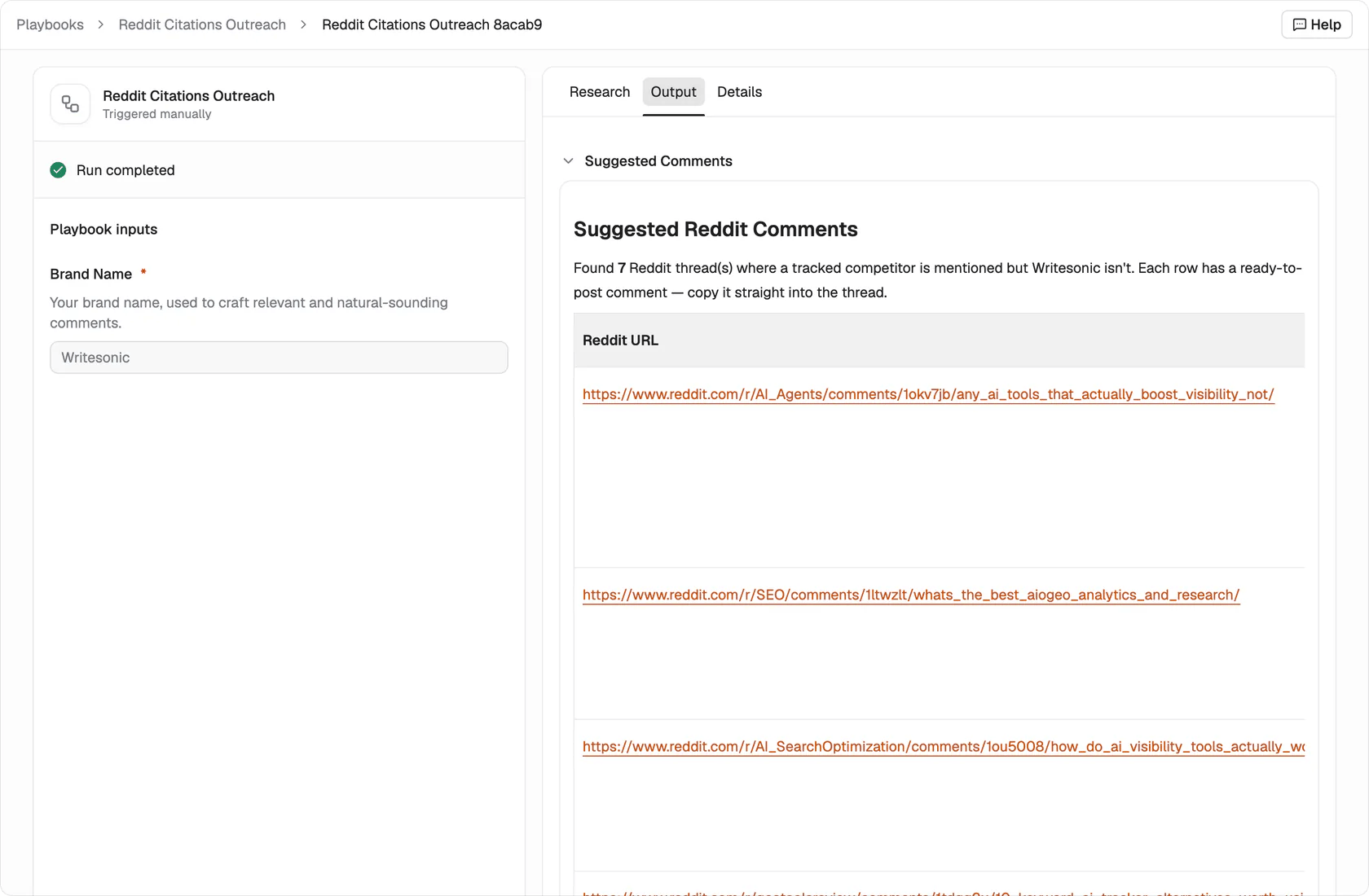 A run records the inputs it was given and keeps them with the result, so you can see exactly what produced a given output. **Research**, **Output** and **Details** split what came back: Output is the deliverable, and the other two show the working behind it.
## Every template can become your own
A template is a starting structure, not a locked process. Open it in the editor, keep the steps that match how you work, and change the ones that don't.
## What's next
Describe your own process and turn it into a playbook.
Run one playbook across many rows.
A run records the inputs it was given and keeps them with the result, so you can see exactly what produced a given output. **Research**, **Output** and **Details** split what came back: Output is the deliverable, and the other two show the working behind it.
## Every template can become your own
A template is a starting structure, not a locked process. Open it in the editor, keep the steps that match how you work, and change the ones that don't.
## What's next
Describe your own process and turn it into a playbook.
Run one playbook across many rows.