> ## Documentation Index
> Fetch the complete documentation index at: https://apidocs.writesonic.com/llms.txt
> Use this file to discover all available pages before exploring further.
# How Writesonic Agents works
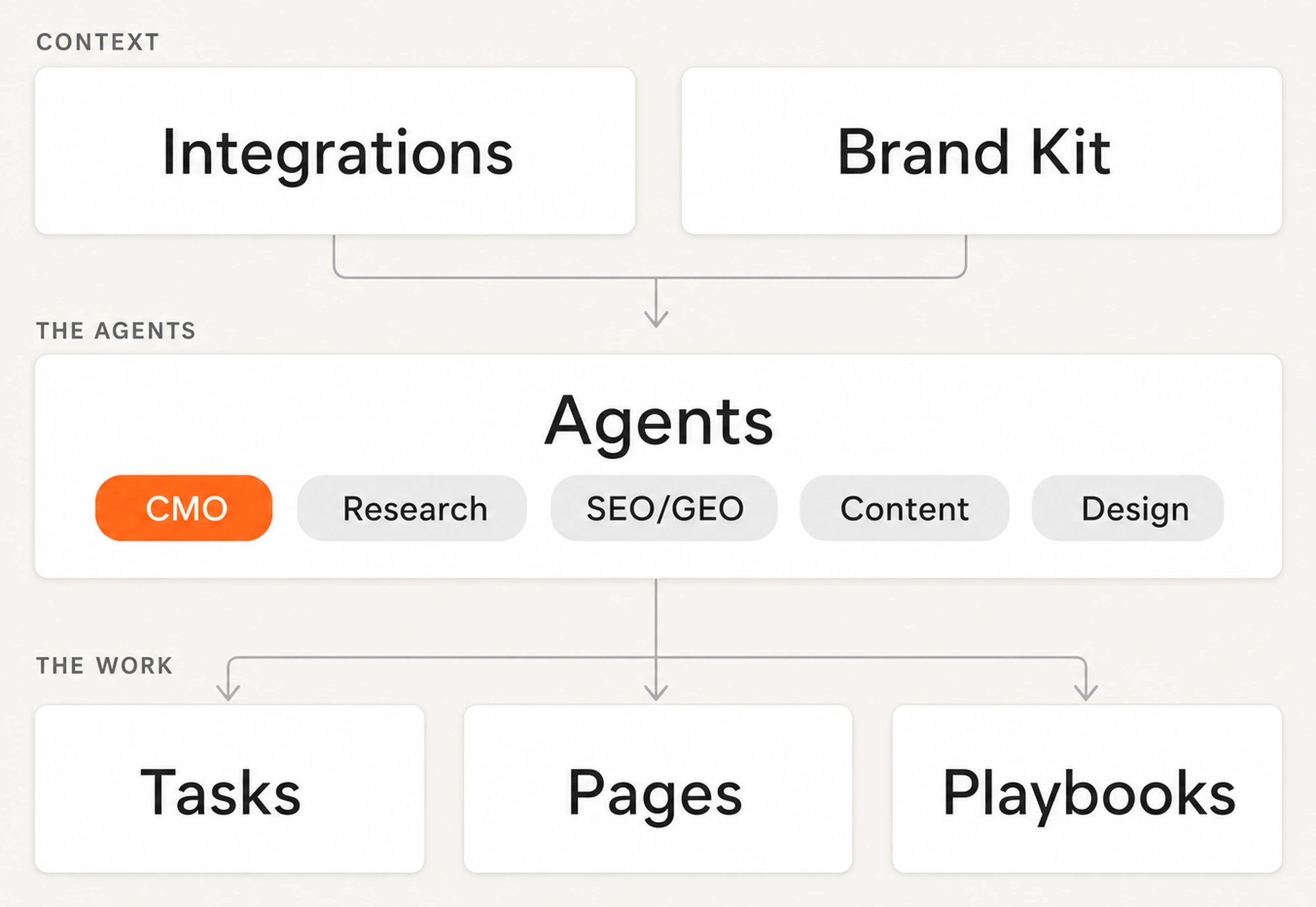
> Integrations, the Brand Kit, the agents, tasks, pages and playbooks. This page shows how they fit together.
You've run a task. Now the rest of the sidebar needs a map.
Agents is in beta, and access is limited to selected enterprise and agency accounts. Ask your account manager, or [book a demo](https://writesonic.com/?demo=open).
## Writesonic tracks AI search, and Agents does the work
The Writesonic platform is your **AI search data layer**. It tracks how your brand appears in AI answers, which prompts include you, and who gets cited instead of you.
Agents is the **execution layer**, and it works from more than that. It adds Search Console, Analytics and your CMS on top, so the work gets decided from every signal you have rather than from AI search alone.
Both run on the same Writesonic login and account. The platform sidebar opens `agents.writesonic.com`.
## Integrations and the Brand Kit give every agent its context
Integrations bring in Search Console, Analytics, CMS, optional CRM and conversion signals, plus AI visibility from the platform with no setup.
The Brand Kit defines who you are, who you sell to, and how you sound. Every agent uses this combined context, and thin context produces generic work.
 ## Specialists do the work, and the CMO delegates it
Research, SEO/GEO, Content, and Design are specialists. Send one artifact directly to the agent responsible for it. The CMO agent does no work itself. Send it a list or research-led job instead. It splits the goal into subtasks for the right specialists.
## A task is one unit of work, and you decide when it's done
A task is one assignment to an agent. The agent plans it, does the work, and returns a deliverable. Larger tasks split into subtasks across the [task lifecycle](/agents/tasks). You choose how much to review. CMS work lands as a draft because nothing publishes automatically, and you mark the task Done.
## Pages join the signals, and playbooks make the work repeatable
[Pages](/agents/pages) gives every URL on your site one 360-degree record, joining its SEO, content, and AI-search signals so each named gap belongs to that exact page.
A [playbook](/agents/playbooks) records a workflow once, then runs it again. Use it on one page or across hundreds.
## What's next
See the full lifecycle and every status.
Learn how the three review modes work.
## Specialists do the work, and the CMO delegates it
Research, SEO/GEO, Content, and Design are specialists. Send one artifact directly to the agent responsible for it. The CMO agent does no work itself. Send it a list or research-led job instead. It splits the goal into subtasks for the right specialists.
## A task is one unit of work, and you decide when it's done
A task is one assignment to an agent. The agent plans it, does the work, and returns a deliverable. Larger tasks split into subtasks across the [task lifecycle](/agents/tasks). You choose how much to review. CMS work lands as a draft because nothing publishes automatically, and you mark the task Done.
## Pages join the signals, and playbooks make the work repeatable
[Pages](/agents/pages) gives every URL on your site one 360-degree record, joining its SEO, content, and AI-search signals so each named gap belongs to that exact page.
A [playbook](/agents/playbooks) records a workflow once, then runs it again. Use it on one page or across hundreds.
## What's next
See the full lifecycle and every status.
Learn how the three review modes work.